Industrial · · 3 min read
Factory and Production Line Models — Industrial Display Models from CAD
How factory layout and production line scale models are built from factory floor plans and CAD models, which scale to use, how to show processes with cut-aways, lighting and motion, and where they pay off.
By the SZT Model project team · Reviewed by David Wang
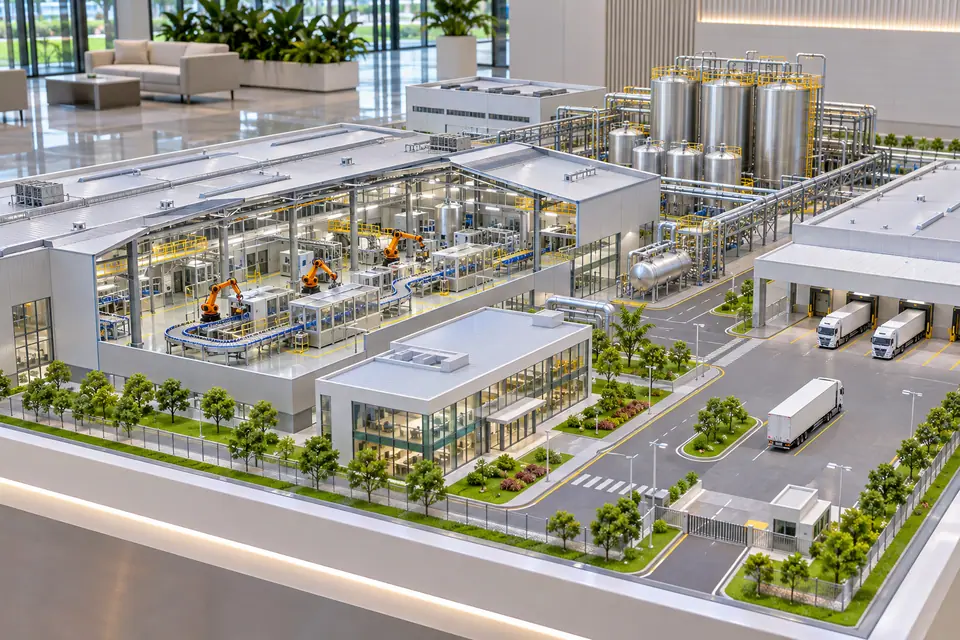
Short answer: A factory or production line model is a physical scale model built from the plant's layout drawings and CAD models, usually at 1:50 to 1:200 for production lines and 1:300 to 1:1000 for whole sites. Cut-away roofs, colour-coded process flows, lighting and moving conveyors explain operations to investors, customers, officials and new employees in minutes.
Most factories are hard to visit and harder to explain. A production line model puts the whole process on one table: raw material in, product out, with every machine in the right place.
Typical scales
| Subject | Scale | Why |
|---|---|---|
| Single machine or cell | 1:10 – 1:25 | Shows components, safety guarding, operator positions |
| Production line or workshop | 1:50 – 1:100 | Machines remain recognisable, flow is clear |
| Whole plant with logistics | 1:200 – 1:500 | Buildings, yards, utilities, expansion phases |
| Industrial park or port | 1:500 – 1:2000 | Site context, transport links |
Starting from your data
Industrial models are built from the same files engineers already have:
- Factory floor plan drawings (DWG/PDF) for layout and dimensions
- CAD assemblies of machines (STEP, IGES, SolidWorks, Inventor) — simplified for scale
- Plant 3D / BIM for buildings, pipe racks and utilities
- Process flow diagrams to choose what to highlight
Complex mechanical 3D models are simplified to what reads at the chosen scale; a 5 mm bolt does not exist at 1:100, but the colour and outline of every machine do.
Telling the process story
- Cut-aways: removable or transparent roofs reveal the line.
- Colour coding: raw material, work in progress and finished goods in distinct colours.
- Lighting sequences: light each process step in order with a narration.
- Motion: moving conveyors, rotating robot arms or turning wind turbines.
- Touch control: a screen that selects a process step and lights it on the model.
Where industrial models pay off
- Investor and customer visits when the real plant is far away or clean-room restricted
- Trade fairs, where a model replaces machines that cannot be shipped
- Government and planning approvals for new plants
- Training and safety induction
- Corporate showrooms and museums
Energy and infrastructure models — power plants, wind farms, water treatment, ports — follow the same principles. See our industrial and energy display model service.
Frequently asked questions
What scale should a factory model be?
Use 1:50 to 1:100 for a production line where machines must be recognisable, and 1:200 to 1:500 for a whole plant with buildings and logistics yards.
Can you build a factory model from our CAD files?
Yes. We use your factory floor plan and CAD assemblies as the source, simplify them for the chosen scale and send a 3D master file for approval before production.
Can the production line model move?
Yes. Conveyors, robot arms, cranes and rotating equipment can be motorised and synchronised with lighting and a touch-screen narrative.
Is a physical model better than a 3D animation for a factory?
They work best together. The animation explains the process in sequence; the physical model shows the whole plant at once and draws people at a trade show or in a showroom.
Related service
Industrial & Energy Display Models — Factory layouts, production lines, energy systems and construction machinery — engineered models that make complex operations easy to grasp.